

Identify the Signs of a Negative SEO Attack

Introduction
Search engine optimization (SEO) is a vital component of any successful online business. By optimizing your website, you can rank higher on search engines, attract more visitors, and improve conversions. However, while many focus on improving their SEO, there are malicious individuals and competitors who engage in negative SEO tactics to damage a website’s rankings and reputation.
Negative SEO attacks involve using black-hat techniques to sabotage a competitor’s search rankings. If left unchecked, these attacks can lead to lost traffic, revenue decline, and potential Google penalties. This comprehensive guide will help you identify the signs of a negative SEO attack so you can take Recovery action before serious damage occurs.
What Is Negative SEO?
Negative SEO refers to unethical practices intended to harm a website’s search rankings. These attacks can be carried out by competitors, hackers, or malicious entities looking to weaken your online presence. Negative SEO includes tactics like building spammy backlinks, content scraping, hacking, and generating fake negative reviews.
The key objective of a negative SEO attack is to make your site appear untrustworthy in the eyes of search engines, leading to penalties or rank drops. While Google is getting better at detecting and ignoring such attacks, it’s still crucial for website owners to monitor and mitigate potential threats. If you suspect your website has been targeted, consulting a Negative SEO expert can help you assess and recover from potential damages.
Common Signs of a Negative SEO Attack
1. Sudden Drop in Search Rankings
One of the most alarming signs of a negative SEO attack is a sharp drop in your website’s search rankings. If you notice your pages suddenly plummeting on Google’s search results without any significant changes to your SEO strategy, it may be due to negative SEO efforts.
2. Influx of Toxic Backlinks
Spammy backlinks are among the most common negative SEO tactics. Attackers generate thousands of low-quality or irrelevant links to your website, making it appear as though you are engaging in black-hat link-building tactics. These toxic backlinks can come from:
Adult or gambling sites
Foreign-language domains with no relevance
Automated link farms and directories
Using tools like Google Search Console, Ahrefs, or SEMrush, you can monitor your backlink profile and identify any sudden spikes in toxic links.
3. Fake Negative Reviews and Reputation Damage
Online reputation plays a critical role in business success. A negative SEO attack can involve fake negative reviews on platforms like Google My Business, Yelp, and Trustpilot. These reviews are designed to tarnish your credibility and drive potential customers away.
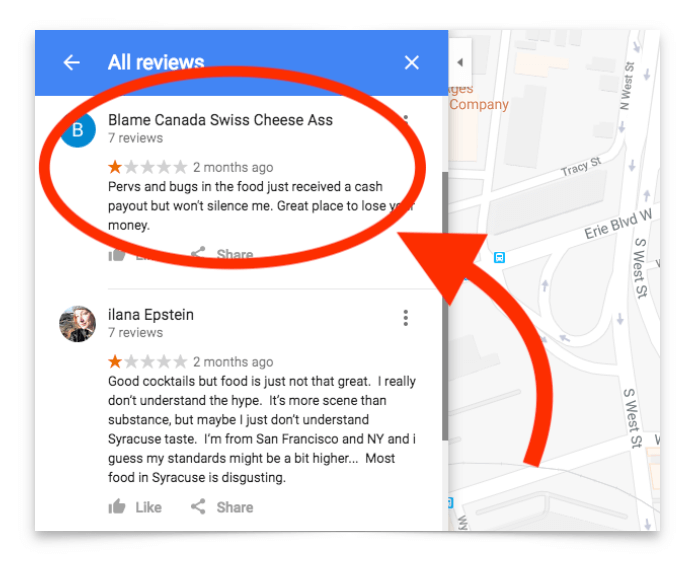
If you suddenly receive an influx of bad reviews from unknown users, it could be a sign that someone is attempting to damage your brand’s reputation.
4. Website Speed and Performance Issues
Hackers may attempt to slow down your website by sending an overwhelming number of requests (DDoS attacks) or injecting malicious code. A sudden decrease in website performance, frequent crashes, or slow loading times could indicate a negative SEO attack.
You can use tools like Google PageSpeed Insights or GTmetrix to check for performance issues and identify any unusual server activity.
5. Unauthorized Content Removal or Indexing Issues
In some cases, attackers may submit false DMCA takedown requests to remove your content from search engine results. Additionally, they might modify your website’s robots.txt file or use canonical tags to de-index important pages from Google. If you notice key pages disappearing from search results, check for unauthorized changes in your site’s settings.
6. Content Scraping and Duplicate Content Issues
Content scraping occurs when malicious actors copy your original content and publish it on multiple sites without permission. If search engines detect duplicate content, your rankings may be affected.
You can check for duplicate content using Copyscape or Google Search by searching for an exact match of your content within quotes.
7. Google Search Console Warnings and Manual Penalties
If Google detects suspicious activities, it may issue warnings or manual penalties against your website. Regularly check Google Search Console for:
Unnatural link warnings
Security breaches or malware alerts
Indexing issues and penalties
8. Cloaking or Unwanted Redirects
Cloaking is a technique where different content is shown to users and search engines. If someone gains access to your website, they might inject malicious redirects or cloaking scripts that lead users to harmful sites. Use security plugins and regularly audit your site to detect such issues.
How to Protect Your Website from Negative SEO Attacks
1. Monitor Your Backlink Profile
Use backlink analysis tools like Ahrefs, SEMrush, or Moz to monitor incoming links. If you find spammy or toxic backlinks, use Google’s Disavow Tool to prevent them from harming your rankings.
2. Set Up Google Search Console Alerts
Enable email notifications in Google Search Console to receive alerts about suspicious activities, such as sudden indexing issues, security threats, or unnatural links.
3. Implement Strong Website Security Measures
Prevent unauthorized access by:
Using strong passwords and two-factor authentication (2FA)
Keeping your CMS, themes, and plugins updated
Installing security plugins like Wordfence (for WordPress) or Sucuri
Regularly backing up your website
4. Track and Manage Online Reviews
Use tools like Google Alerts and ReviewTrackers to monitor online reviews. If you identify fake reviews, report them to the respective platform for removal.
5. Regularly Check Website Performance
Monitor your website’s speed and uptime using tools like Pingdom or UptimeRobot. If your site slows down unexpectedly, investigate for possible DDoS attacks or malware.
6. Keep an Eye on Content Theft
Use plagiarism detection tools to track unauthorized copies of your content. If you find scraped content, file a DMCA takedown request to Google and the hosting provider.
7. Audit Your Site for Technical SEO Issues
Regular SEO audits help detect indexing problems, content issues, and malicious activities. Tools like Screaming Frog and Sitebulb can provide valuable insights into your site’s health.
Conclusion
Negative SEO attacks can severely impact your website’s rankings, traffic, and reputation. By staying vigilant and regularly monitoring your website’s backlinks, reviews, performance, and security, you can identify potential threats early and take corrective actions. Implementing strong security measures and regularly auditing your site will ensure that your business remains protected against unethical competitors and cyber threats.
By being proactive, you can safeguard your SEO efforts and maintain a strong online presence despite potential attacks.


